
Purpose
Measure and display the rate of data across a network connection or data being stored in a file.
Source
Current version is 2.8
Github: https://github.com/wardi/speedometer
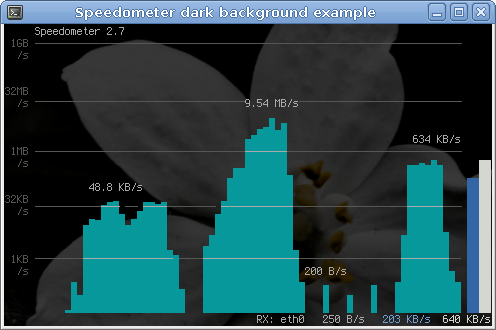
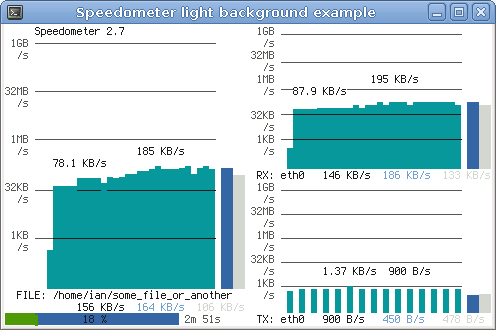
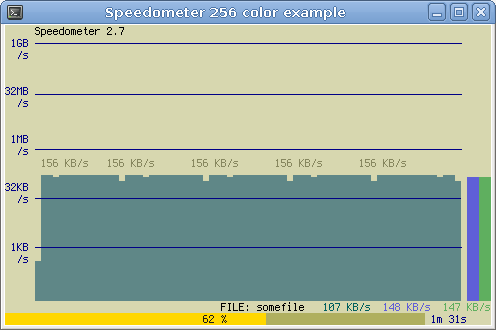
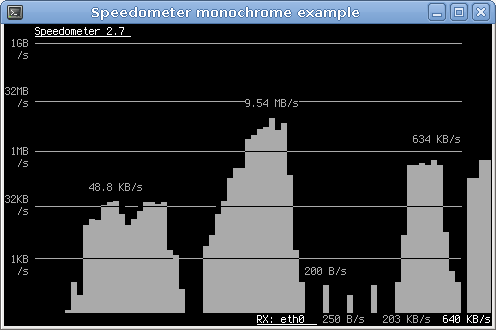
Screenshots
Installation
Debian or Ubuntu
apt-get install speedometer
Others
Download and install Urwid (recommended).
Download the speedometer source.
As root issue the following commands in the directory that you downloaded the source file:
cp speedometer.py /usr/local/bin/speedometer
chown root: /usr/local/bin/speedometer
chmod 755 /usr/local/bin/speedometer
Usage
Usage: speedometer [options] tap [[-c] tap]...
Monitor network traffic or speed/progress of a file transfer.  At least one
tap must be entered.  -c starts a new column, otherwise taps are piled
vertically.

Taps:
  -f filename [size]          display download speed [with progress bar]
  -r network-interface        display bytes received on network-interface
  -t network-interface        display bytes transmitted on network-interface
  -c                          start a new column for following tap arguments

Options:
  -b                          use old blocky display instead of smoothed
                              display even when UTF-8 encoding is detected
                              (use this if you see strange characters)
  -i interval-in-seconds      eg. "5" or "0.25"   default: "1"
  -k (1|16|88|256)            set the number of colors this terminal
                              supports (default 16)
  -l                          use linear charts instead of logarithmic
                              you will VERY LIKELY want to set -m as well
  -m chart-maximum            set the maximum bytes/second displayed on
                              the chart (default 2^32)
  -n chart-minimum            set the minimum bytes/second displayed on
                              the chart (default 32)
  -p                          use original plain-text display (one tap only)
  -s                          use bits/s instead of bytes/s
  -x                          exit when files reach their expected size
  -z                          report zero size on files that don't exist
                              instead of waiting for them to be created
Usage Examples
How long it will take for my 38MB transfer to finish?
speedometer favorite_episode.rm $((38*1024*1024))
How quickly is another transfer going?
speedometer dl/big.avi
How fast is this LAN?
host-a$ cat /dev/zero | nc -l -p 12345

host-b$ nc host-a 12345 > /dev/null
host-b$ speedometer -rx eth0
How fast is the upstream on this ADSL line? (start an upload first)
speedometer -tx ppp0
How fast can I write data to my filesystem? (with at least 1GB free)
dd bs=1000000 count=1000 if=/dev/zero of=big_nothing &
speedometer big_nothing
Changelog
Speedometer 2.8 - 2011-12-08
-
Add a linear scale option: -l. Best used in combination with -m (and possibly -n) to customize the range to be displayed. Thanks to jukie.net for sponsoring this feature.
-
Replace silly “curved” reading with a weighted moving average
-
New option to disply all values in bits per second: -s
-
New options to set minumum (-n) and maximum (-m) values displayed on the graphs in bytes/s. Defaults are -n 32 and -m 2**32
-
Accept shortened versions of -rx and -tx: -r and -t My intent is to drop use of the original forms in 3.0 and add –long-versions of all options
-
Use IEC notation of sizes MiB, GiB etc.
-
Install script as both speedometer.py and speedometer
Speedometer 2.7 - 2010-11-08
-
Work better with light, dark and transparent backgrounds
-
Added monochrome and 88/256 color modes
-
New option to exit once a monitored download completes
-
Requires Urwid 0.9.9.1 or later
Speedometer 2.6 - 2008-05-30
-
Increase scale maximum to > 1GB/s
-
Hide Python traceback when user presses ^C
-
Make using plain text mode when Urwid is unavailable the default
-
Make blocky and smoothed modes look more similar
-
Fix simulation and file progress bugs
Speedometer 2.5 - 2007-10-20
-
Use Urwid’s raw_display instead of curses_display module
-
Use regexp instead of find for parsing network information
Speedometer 2.4 - 2006-04-09
-
New -z option treats files that don’t exist as zero length so speedometer will not wait for them to be created at startup.
-
Multiple file taps may now be used stacked vertically in the same column.
Speedometer 2.3 - 2006-03-08
-
Graphs may now be displayed with 8 times the resolution of old blocky graphs using a new UTF-8 smoothed display mode. Requires UTF-8 capable terminal in UTF-8 encoding (try uxterm) and Urwid 0.9.1 or later.
-
Use math.log without base for compatibility with Python 2.1.
Speedometer 2.2 - 2005-12-27
- Read network statistics from /proc/net/dev instead of /sbin/ifconfig. Reduces CPU usage by 75% on test machine. Thanks to Don Rozenberg for the patch.
Speedometer 2.1 - 2005-11-05
-
New simultaneous display of multiple graphs with options for stacking graphs vertically or horizontally
-
New labels to differentiate each graph
-
Removed 0-32 B/s from display to make more room for higher speeds
-
Fixed a wait_creation bug
Speedometer 2.0 - 2005-10-21
-
New full-console bar graph display based on Urwid 0.8.9
-
Realigned graphic scale to more common units
Speedometer 1.4 - 2003-07-18
- New average and “smoothed” readings added
Speedometer 1.3 - 2003-05-19
- New -i option for changing the refresh interval
Speedometer 1.2 - 2003-03-21
- Initial public release